Release notes history
Here are the Waterfall release notes from May 2022 - Dec 2025. To stay current on feature updates, see the latest release notes.
| Release | Features and fixes |
|---|---|
| December 18, 2025 |
PIN-Based Broadcast Authentication (now applicable to UK Waterfall) Multi-Factor Authentication (MFA) (now applicable to UK Waterfall) |
| December 15, 2025 |
PIN-Based Broadcast Authentication (applicable to US Waterfall only) Bug Fixes |
| December 11, 2025 |
Multi-Factor Authentication (MFA) (applicable to US Waterfall only) Bug Fixes |
| November 25, 2025 | Enable Non-Broadcast Messaging in US |
| November 23, 2025 |
New: Broadcast Approval System |
| October 28, 2025 | SMS Fallback for Rich Communication Services (RCS) Messages |
| October 7, 2025 |
Multi-Select Campaigns for Message Details Report (MDR) Rich Communication Services (RCS) in Inbox and Conversations Client-Facing API Documentation |
| September 23, 2025 |
Waterfall UI updates: List Details Report – Dynamic "All Lists" support Scheduled, Recurring, and Immediate Run List Details Reports improvements Rich Communication Services (RCS) updates |
| September 9, 2025 | Backend improvements |
| August 2025 |
Opt-Out Webhook enhancement RCS availability in Broadcasts Canadian Short Code fix Updated links in Waterfall API documentation webpage links Originator labels Keyword update Bug fixes |
| July 2025 |
iShortener feature Mobile Commons logo Bug fixes |
| June 2025 |
Broadcast API updates Bug fixes |
| May 2025 |
Originator with label Penetration testing Metadata List performance improvements Bug fixes |
| April 2025 |
List upload Message headers and footers “Recurring” and “Scheduled” reports Usage report Bug fixes |
| March 2025 |
SMS message count with Unicode Bug fixes |
| February 2025 |
Manage subscribers in broadcast Zendesk integration (by invitation only) Seamless Upland Credential Manager (UCM) login Enhanced Message Details Report (MDR) and Message Summary Report (MSR) |
| January 2025 |
iShortener Reports (UK only) Bug fixes |
| October 2024 |
Broadcast – Manage Subscribers PostToURL component update Bug fixes |
| September 2024 |
Enhanced message summary reporting Cross-region number search Improved iShortener (US only) Multi-Factor Authentication (MFA) for UCM Increased broadcast throttle limits Upland Credential Manager (UCM) SSO/IDP/IAM integration Expiry message configuration Password reset from the UCM portal Email migration restriction |
| July 2024 |
Email verification Metadata addition Message expiry Delivery status report |
| June 2024 |
Waterfall UK regional support Cross-region list uploads and messaging Lower throttling rates Subscriber access permissions UI refresh |
| April 2024 |
Subscriber search improvement Additional list details |
| March 2024 |
Broadcast throttling (US / Canada) Account and sub-account level footers for broadcast messages |
| February 2024 |
Broadcast throttling (UK only) Bug fixes |
| December 2023 |
Broadcast template updates Headers in broadcast messages Upload lists with special characters |
|
Inbox with reply messaging Broadcast template updates Headers in broadcast messages Phone numbers and dates in UK format Delete subscriber Upload lists with special characters |
|
| September 2023 |
Waterfall (UK) added to the Help Center Waterfall (UK) API docs Broadcast messaging templates |
| June 2023 |
Upland Assist for Waterfall New Help Center |
| December 2022 |
Waterfall UK regional support Metadata filtering improvements User name display on the Schedule Broadcast screen |
| November 2022 |
Waterfall UK regional support Waterfall language updates for Canada short codes |
| September 2022 | Metadata filtering improvements |
| May 2022 |
Post to API component Dynamic Poll component |
December 18, 2025
Multi-Factor Authentication (MFA) Required for Logging in to Waterfall (now applicable to UK Waterfall)
All UK Waterfall users must now complete Multi-Factor Authentication (MFA) when logging in to Waterfall for enhanced account security.
Using Multi-Factor Authentication (MFA):
-
Enter your email/username and password.
-
Check your email for the verification code.
-
Enter the code on the verification screen.
-
Access your Waterfall account.
For more information, see Using Multi-Factor Authentication (MFA) via Email
If you need further assistance, please contact wf_support@mobilecommons.com.
PIN-Based Broadcast Authentication (now applicable to UK Waterfall)
Starting today, all UK Waterfall users will use a 4-digit PIN to send, schedule, or edit broadcasts.
Action Required:
All UK Waterfall users must set up a PIN before sending broadcasts.
-
Click the banner prompt when you log in.
-
Go to Settings → Edit User → Create your 4-digit PIN.
-
Verify with the code sent to your email.
-
Start using your PIN for broadcasts.
For more information, see PIN-Based Broadcast Authentication
December 15, 2025
PIN-Based Broadcast Authentication (applicable to US Waterfall only)
Starting today, all US Waterfall users will use a 4-digit PIN to send, schedule, or edit broadcasts.
Action Required:
All US Waterfall users must set up a PIN before sending broadcasts.
-
Click the banner prompt when you log in.
-
Go to Settings → Edit User → Create your 4-digit PIN.
-
Verify with the code sent to your email.
-
Start using your PIN for broadcasts.
For more information, see PIN-Based Broadcast Authentication
Bug Fixes
The US Waterfall MFA login issue due to cache/cookies has been resolved.
December 11, 2025
Multi-Factor Authentication (MFA) Now Required for Logging in to Waterfall (applicable to US Waterfall only)
All Waterfall US users must now complete Multi-Factor Authentication(MFA) when logging in to Waterfall for enhanced account security.
Using Multi-Factor Authentication (MFA):
-
Enter your email/username and password.
-
Check your email for the verification code.
-
Enter the code on the verification screen.
-
Access your Waterfall account.
For more information, see Using Multi-Factor Authentication (MFA) via Email
If you need further assistance, please contact wf_support@mobilecommons.com.
Bug Fixes
• The timezone broadcast delay issue has been resolved.
November 25, 2025
Waterfall - Enable Non-Broadcast Messaging in US
Reverted 1:1 messaging functionality to implement IP-based access control.
1:1 Messaging (UI & API):
• Implemented IP whitelist validation for 1:1 message sending.
• Send functionality restricted to pre-approved IP addresses.
• UI remains accessible to all users; backend enforces IP restrictions.
Broadcast Messaging:
• No changes — the approval workflow continues to function as expected.
Login:
• No restrictions — all users can log in normally.
November 23, 2025
New: Broadcast Approval System
What changed?
Starting today, all broadcasts need approval from your Customer Success Manager (CSM) before they're sent.
How it works:
1. Create your broadcast as usual.
2. Your broadcast goes to "Awaiting Approval" — find it in the new tab under Broadcasts > Scheduled > Awaiting tab.
An approval notification is automatically sent to the CSM.
3. Your broadcast sends after the CSM approval.
– Send Now broadcast is sent immediately at approval.
– Scheduled broadcast is sent at the scheduled time.
– If approval is given after the scheduled time, it will be sent immediately.
The same will work for Timezone broadcasts and Throttle broadcasts.
What about other messaging?
We've temporarily paused this feature while we add approval workflows:
-
All non-broadcast messaging is temporarily disabled.
Everything else?
All other Waterfall features work exactly as before.
October 28, 2025
What's New
We're excited to announce SMS fallback capability for Rich Communication Services (RCS) messaging in Waterfall. This enhancement ensures your messages reach subscribers even when their devices don't support RCS.
Key Features
SMS Fallback Messages
When a subscriber's device or network doesn't support RCS, messages will automatically fall back to SMS delivery, ensuring 100% message reach.
-
Enhanced Fallback Capabilities:
-
Extended character limit – SMS fallback messages support more than 160 characters and will be delivered as multipart SMS when needed.
-
Rich customization options – All standard SMS toolbar features are available:
-
Headers – Add identifying details (name, mobile, company/subaccount).
-
Dynamic insertion – Personalize messages with subscriber metadata fields.
-
Link shortener – Reduce character count with shortened URLs (dqs.co for US, sms.st for UK).
-
Tag metadata – Include static or dynamic metadata values using tokens ($keyword, $MM$dd$yyyy, $inc, $dec).
-
-
Availability:
SMS fallback is available when sending:
-
Broadcast messages
-
Inbox messages (Send Message)
-
Individual (1:1) messages in subscriber conversations
-
October 7, 2025
-
Multi-Select Campaigns for Message Details Report (MDR): You can now generate the Message Details Report (MDR) using All, Single, or the newly added multi-selection campaign option.
-
Rich Communication Services (RCS) in Inbox and Conversations: RCS messaging is now available within Inbox and Conversations.
-
Client-Facing API Documentation: The client-facing API documentation has been updated with the latest endpoints.
September 23, 2025
-
Waterfall UI
-
List Details Report – Dynamic "All Lists" Support: Made improvements to the Scheduled, Recurring, and Immediate Run List Details reports.
-
When a user selects "All Lists" from the dropdown, the system dynamically updates the list selection at the time of report generation. This ensures that any changes in the number of lists (additions or deletions) are automatically reflected.
-
For Immediate Run reports or Scheduled/Recurring reports, if "All Lists" is selected, the summary screen will display "All Lists" instead of listing individual list names.
-
-
Rich Communication Services (RCS): RCS is now available in Campaigns and Subscriber Profiles.
(Invitation only, subject to registration and approval. To learn more, contact your Customer Success Manager.)
September 9, 2025
Made backend improvements to MongoDB aggregation for better performance and data accuracy. No changes to the Waterfall user interface.
August 2025
-
Opt-Out Webhook Enhancement
-
Waterfall can now notify clients of any opt-out via a webhook, which can be configured in the admin application.
-
-
RCS Availability in Broadcasts
-
Rich Communication Services (RCS) is now supported in broadcast for both US and UK audiences, enabling richer messaging experiences.
-
Currently, Waterfall supports text-only RCS.
-
Subject to registration and approval. To learn more, contact your Customer Success Manager.
-
-
Canadian Short Code Fix: The INFO keyword was added with bilingual responses.
-
All links in Waterfall have been updated to the new Mobile Commons directed pages.
-
API documentation webpage links now redirect to Mobile Commons.
-
Originator labels can be assigned with spaces and support up to maximum 20 characters for short code (SC) or long code (LC).
Bug Fixes
The following issues have been resolved as part of the release:
-
Admin app labels are now optional.
-
Fixed an email notification issue where the previous email address was used for second uploads.
-
Resolved an issue where the first coupon was ignored in Excel-created files (UK only).
-
Fixed a problem with extra characters appearing in the first coupon when a file was created in Excel (US only).
Customer Request
-
Successful keyword update done for a customer.
July 2025
iShortener Feature
-
The iShortener feature is now available in the Waterfall UK UI.
Mobile Commons Logo
-
Mobile Commons logo has been updated in the Waterfall UI.
Bug Fixes
The following issue has been resolved as part of the release:
-
Fixed validations between the Waterfall UI and Waterfall API for the Admin App “Label” field.
June 2025
Broadcast API Updates
-
Updated broadcast API to return the description and name of broadcast.
-
Broadcast API can now allow filtering exclusively between “editing” and “scheduled”.
Bug Fixes
The following issues have been resolved as part of this release:
-
Fixed Delivery Receipt (DR) server issue.
-
Fixed incorrect upload status for list uploads in the Waterfall UI.
-
Added catchall response after campaign active days and buffer days (that were not available earlier) are finished for expiry message (buffer time is hardcoded for 14 days in the backend).
May 2025
Originator with Label
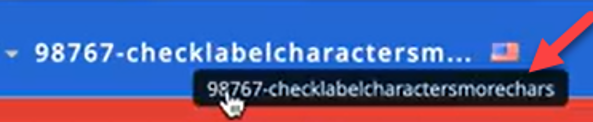
A new text field, “Label”, is now available in the admin app to specify the name for the short code (SC) or long code (LC), which will then be displayed next to the originator value in the Waterfall UI.

If the label is too long to display in full, hover over it to see the complete name in a tooltip.
Penetration (Pen) Testing
-
Missing Authentication Improvement: Reports sent via email to a client will remain accessible for 7 days. Additionally, reports are always available to download from the Waterfall UI.
-
Broken Access Control Improvement and Authentication Bypass Improvement: Passwords can now be changed only by the user or the root user.
Metadata
Accented characters can now be successfully added to the metadata by uploading metadata or by adding it from subscriber profile.
List Performance Improvements
For newly created lists, a unified downloadable Errors file is provided when clicking the ERRORS or PARTIALLY_UPLOADED hyperlinks.
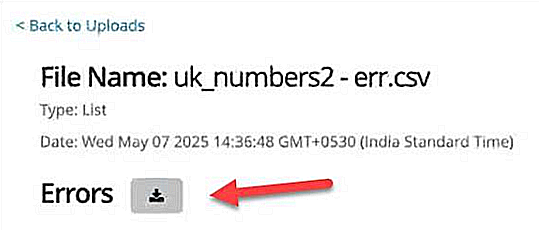
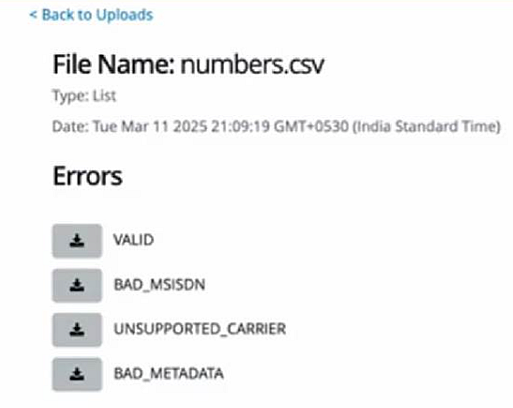
Note: Older lists will still provide four separate downloadable files (as shown below).
Bug Fixes
The following issues have been resolved as part of this release:
-
Fixed an issue where message counts were escaping from Message Details Report (MDR) due to encoding issue.
-
Importing a list of users via API now proceeds even if a null or blank MSISDN is found, skipping only the individual record instead of the entire list.
April 2025
List Upload
-
Users can now enter their email address(es) while uploading a list to receive an email notification for successful, partial, or unsuccessful list uploads.
-
For partial uploads, users can now click the hyperlink available for the partially uploaded lists to download different CSV files to track records which were VALID, BAD_MSISDN, UNSUPPORTED_CARRIER, or BAD_METADATA during list uploads.
Message Headers and Footers
Message headers and footers are now available in Conversations, Inbox (UK only), and individual subscriber pages.
“Recurring” and “Scheduled” Reports
A hyperlink is now available on “Recurring” and “Scheduled” report names, which, when clicked opens the editing page for that report and provides the recent template ID for the recent report.
Usage Report
-
A new report named “Usage Report” has been created to validate the exact count of messages as shown in the billing report. This report is available to all users.
-
Only root users can create a Usage Report with system messages.
Bug Fixes
The following issues have been resolved as part of this release:
-
Fixed an issue where scheduling a broadcast for “Later,” adding an extra list in a broadcast, or editing a scheduled broadcast caused the “Send” broadcast option to change to “Now”.
-
Fixed mapping issue from backend for certain fields while creating or editing a report:
-
Selected Campaign Mapping in MDR | Poll Summary | Message Summary
-
Selected Keyword Mapping in MDR | Message Summary
-
Selected List Mapping in Subscriber Growth
-
-
Fixed an issue where an incorrect upload number was displayed in the Waterfall UI for message file uploaded records (UK only).
-
Admin App:
-
Enabled debounce and infinite scroll to prevent the page from freezing.
-
Multiselection is now available in the “Originators” and “Users” dropdowns.
-
Multiselected originators and users are now displayed at the top of the list for easier visibility and deselection (if required).
-
March 2025
SMS Message Count with Unicode
-
The SMS message count is now highlighted when Unicode characters are present, providing a visual cue to the user.
-
A notification icon is displayed to alert users that the message count might be higher than expected.
Bug Fixes
The following issues have been resolved as part of this release:
-
Inbox Filtering (UK): Resolved an issue where filtering by name in the Inbox was not functioning correctly.
-
Email Creation with Apostrophes: Users can now successfully create emails containing apostrophes (').
-
Subscriber Button: Fixed a bug that prevented the Subscriber button from working during the "Add Subscription" process.
February 2025
Manage Subscribers in Broadcast
-
Enhanced "Manage Subscribers" functionality, allowing adhoc additions and removals of subscribers.
-
Subscriber counts for adhoc added and excluded subscribers are now displayed on the Broadcast screen.
-
Duplicate user additions are now prevented.
Zendesk Integration (By Invitation Only)
-
Successful communication established between Zendesk and Waterfall users.
-
Currently enabled for one UK customer, but available for all US and UK customers with configurations.
Seamless Upland Credential Manager (UCM) Login
-
Improved user experience with seamless transitions between available applications via App Switcher.
Enhanced Message Details Report (MDR) and Message Summary Report (MSR)
-
In the Message Details Report (MDR), the “Content Type” column now includes “Session Expired" messages.
-
The Message Summary Report (MSR) now has a new column to show the count of "Session Expired" messages.
January 2025
iShortener
-
The iShortener is hidden on the "Roles" page and in the Waterfall UI (UK only).
-
Switched to the new iShortener log table (US only).
Reports
-
Resolved the issue of blank responses in the reports for R&R (UK only).
Bug Fixes
The following issues have been resolved as part of this release:
-
Dynamic Polls: Fixed an issue where the number was being saved with text; now only the numerical value is saved.
-
Templates & Footers: Enabled autocomplete functionality to work for any updates to names in Templates & Footers.
-
Keywords Screen: Resolved page failure while accessing the “Keywords” screen.
-
Subscriber Profile: Fixed spacing issues between text and hyperlinks while viewing the subscriber profile.
-
Manage Subscribers:
-
The net count of final recipients is now displayed, along with adhoc additions and exclusions of subscribers.
-
Fixed an issue where added and excluded subscribers were not displayed in calendar views; they are now properly displayed.
-
Resolved an issue where the Manage Subscribers Select Subscriber dropdown held data from previous searches; it now clears correctly for new searches.
-
October 2024
Broadcast – Manage Subscribers (Add or Remove Subscribers)
-
You can add or remove subscribers from a broadcast list on an adhoc basis using the Manage Subscribers button on the Broadcast screen, with a maximum of 25 subscriber additions allowed.
-
You can search for a subscriber in the search field available in the Manage Subscribers modal by entering their full or partial name and add them as needed.
-
You can exclude a subscriber from the existing list or delete a subscriber from the added list for the particular broadcast—without impacting the original list.
-
Subscribers who are added or excluded are shown in real-time on the Broadcast and Review screen. Already added subscribers cannot be re-added.
For more information, see the "Manage Subscribers" section in Building a new broadcast.
PostToURL Component
Updated the PostToURL component for specific campaigns to include system keywords as defined by customers. (UK only)
Bug Fixes
The following issues have been resolved as part of this release:
-
Lowercase mobile-originates messages (MOs) have been fixed. Now, they display exactly as received, that is, in uppercase or lowercase in reports and the Waterfall UI. (UK only)
-
Reports are now generated based on the user’s environment’s local time.
-
Alignment of permissions on the “Roles” page.
-
App Switcher is now available to customers who have migrated to Upland Credential Manager (UCM).
September 2024
Enhanced Message Summary Reporting
Additional columns have been added to the Message Summary report to provide more granular insights for billing and other reporting purposes.
Multi-Factor Authentication (MFA) for UCM
UCM is now equipped with MFA, allowing companies to verify user identities using third-party authentication or email-based verification.
Increased Broadcast Throttle Limits
The upper limit for broadcast messages has been increased to 200k, and the initial rate has been raised from 600 to 2,000 messages.
Upland Credential Manager (UCM)
Upland Credential Manager has been integrated into Waterfall and the Admin app, providing a centralized platform for managing user credentials.
SSO/IDP/IAM Integration
Single Sign-On (SSO), Identity Provider (IDP), and Identity and Access Management (IAM) capabilities have been added for a customer as per request, enabling seamless authentication and authorization.
Expiry Message Configuration
Users can now configure expiry messages for surveys in both the US and UK regions, providing greater flexibility and control over survey lifecycles.
Password Reset from the UCM Portal
Users migrated to Upland Credential Manager (UCM) can now change their passwords directly from the UCM portal, offering enhanced user self-service capabilities.
Email Migration Restriction
Emails starting with numerical values are not permitted and cannot be migrated to UCM.
Bug Fixes
The following issues have been resolved as part of this release:
-
Cross-Region Number Search: Users can now search for cross-region numbers using international codes and local numbers with both local and international codes.
-
Improved iShortener (US only): The iShortener has been enhanced to ensure the correct website is accessed even if additional symbols such as ~!@#$%^&*()_-+={}:;”'<,.>/?\| are accidentally copied and pasted.
July 2024
Email Verification
-
Waterfall users can now verify their email addresses.
-
Unverified email users will see a banner in Waterfall prompting them to verify their emails.
-
Once a logged-in user verifies their email, they will receive an OTP for email verification.
-
Users who change their already verified email addresses will be prompted to verify the new email while saving their details.
Metadata Addition
-
Metadata can now be added to the message details report.
Delivery Status Report
-
The delivery status report now shows messages in various states: Queued, Sent, Delivered, and Failed.
Message Expiry
-
Message expiry time can now be updated according to client needs (with a default setting of 5 days).
June 2024
Waterfall UK Regional Support
The Waterfall (UK) now provides regional support for the following countries: Australia, Austria, Belgium, Brazil, Canada, China, Denmark, UAE, France, Germany, Hungary, India, Ireland, Italy, Japan, Korea, Mexico, Norway, Poland, Russia, Singapore, Slovakia, Spain, Sweden, and Taiwan.
With this, clients in United Kingdom will be able to send messages outside the United Kingdom.
For more information, see Uploading subscriber data.
Cross-region List Uploads and Messaging (Waterfall UK)
-
Users can now upload numbers in Waterfall regardless of the region of the selected originator.
-
UK originators (long code and brand only) can now message other regions within Waterfall.
-
Existing functionality related to number uploads within the same region remains unaffected.
Lower Throttling Rates
-
Introducing the ability for users to finely adjust broadcast throttling rates, now allowing rates as low as 1 message per minute.
-
Tailor your message distribution strategy to match your specific communication requirements.
For more information, see Building a new broadcast.
Subscriber Access Permissions
Additional subscriber permissions have been added, allowing customers to further tailor access for users. You can now restrict privileges in order to prevent certain users from having access to the subscriber’s profile.
For more information, see Managing subscriber profiles.
UI Refresh
Waterfall's user interface has been updated! The navigation has been relocated to the left-hand side, and the update includes an exciting new set of icons and a refreshed color palette.
April 2024
Subscriber Search Improvement
With the improved subscriber search, users can search for subscribers associated with their sub-accounts.
Additional List Details
Users can now view details of subscribers, including individual names, associated mobile numbers, and email address, by clicking on a list name in Waterfall.
March 2024
Broadcast Throttling (US / Canada)
Broadcast Throttling is now available for the US / Canada version of Waterfall. See Working with throttled messages for more information.
Account and sub-account level footers for broadcast messages
The administrators now have the ability to create footers at both the account and sub-account levels. This feature enables tailored messaging, and compliance efforts across various organizational tiers, ensuring consistent communication while allowing for necessary customization. See Working with broadcast templates & footers for more information.
February 2024
Broadcast Throttling (UK only)
Note: This feature will soon be available for the US / Canada version of Waterfall.
Waterfall users can now create throttled Broadcasts, which allow them to control and monitor the rate at which messages are sent to recipients.
Example: Marco's organization just published the most recent issue of their newsletter, which customers can order by simply calling. He creates a Broadcast message for his recipients instructing them to call the organization to reserve a copy. However, his call center is only staffed with 50 individuals and the recipient list contains approximately 1,000 contacts. In order to ensure that his call center does not get flooded with more calls than it can handle, he creates a throttled Broadcast that will only send a maximum of 25 messages at once. This will prevent his call center employees from receiving more calls than they can handle.
Prior to this release, the Send field could be used to determine when the broadcast message would be sent to users.

With this update, the Send field has been removed. Instead, users can use the new "When do you want the message to be sent?" section to determine when the message will go out.
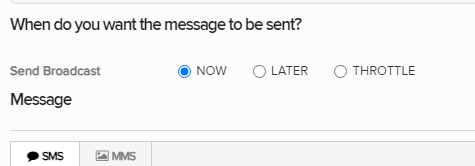
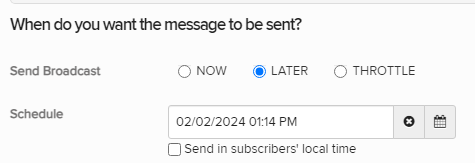
Selecting NOW will send the message immediately. Selecting LATER will open up the same Send field from before this release, allowing the user to schedule a time in the future for the Broadcast to be sent:
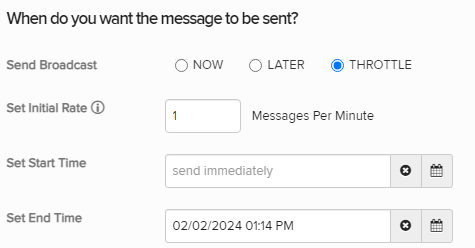
Selecting THROTTLE will open up three new fields:
-
Set Initial Rate: Enter in the maximum number of messages that will be delivered per minute. Once the messages begin to deliver (according to the "Set Start Time" below), no more than the entered number of messages will be delivered each minute.
-
Set Start Time: Select the calendar button
 to choose a date for the first message(s) to be delivered. You can manually edit the date and time by selecting the text box.
Note: Leaving the box empty will result in the first message(s) being sent as soon as the Broadcast is finalized.
-
Set End Time: Select the calendar button
to choose a date for message(s) to no longer be delivered. You can manually edit the date and time by selecting the text box.Note: Even if certain intended contacts have not yet received the broadcast, messages will no longer be sent after the end time.
Once the throttled Broadcast is scheduled, the user will be navigated to the Scheduled Messages page. This page now included a new tab for "Active" Broadcasts:
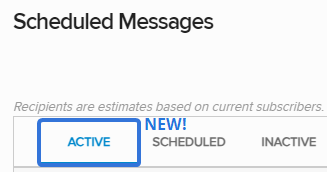
An "Active" Broadcast is a throttled Broadcast that is still in the process of delivering messages. The three columns on the right-hand side of the table allow the user to monitor the Broadcast:
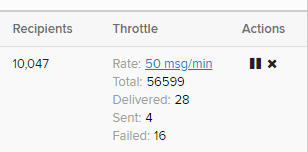
-
Recipients: This column displays the total number of recipients that will be reached with the message.
-
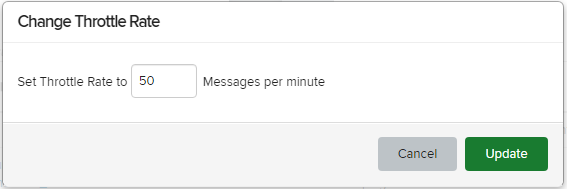
Throttle: This column displays the current statistics of the throttled Broadcast. Users can select the throttle rate to change it:
-
Actions: Users can select the Pause icon
 to temporarily pause the broadcast. When this occurs, the Broadcast will stop sending messages to the recipients. It will appear in the new "Inactive" tab: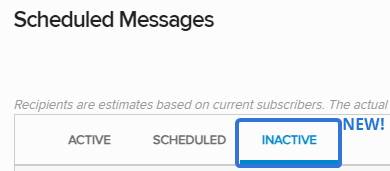
This tab lists all of the throttled Broadcasts that have been paused. It contains the same columns as the "Active" tab, except its "Actions" column allows users to resume the Broadcast by selecting the Play icon
 .
.Also, the user can select the X icon
 on either tab to cancel the rest of the throttling.
See Working with throttled broadcasts for more information.
Bug fixes
The following issues have been resolved as part of this release:
-
Spinning Wheel on Sign Out: The issue that caused a continuous spinning wheel upon signing out of Waterfall has been fixed. Users can now sign out smoothly without experiencing any delays or disruptions.
-
Character Count Display: The character count will now accurately show the number of messages, eliminating the occurrence of negative character counts. This improvement ensures a more precise representation of your message length.
December 2023
This release extends new features and updates to Waterfall (US and Canada).
Broadcast template updates
This release includes the following refinements to broadcast messaging templates:
-
Waterfall users can now view the character count in the broadcast messaging template.
-
The character count provides a visual warning in red, which helps users avoid unintentionally creating multi-part messages.
Users can also share broadcast messaging templates with their entire account or specific subaccounts, which offers flexibility and collaboration options for template sharing among users.
Headers in broadcast messages
Waterfall users can now add their name, subaccount, and phone number details to a header in broadcast messages.
Upload lists with special characters
Waterfall customers now can use special characters, for example $ (dollar sign), £ (pound sign) and € (Euro sign), in metadata record fields.
November 2023
This release includes new features and updates for Waterfall (UK) only.
Inbox with reply messaging
This update extends Conversational Messaging to all Waterfall (UK) customers, enabling them to create, send, and manage 1:1 conversations efficiently. For more information, see Working with the Inbox.
The new Inbox feature provides a dedicated space for two-way communication. Waterfall (UK) users with special permissions can now view subscriber responses, access contact details, archive responses (with the option to customize for specific users), and filter responses by date, sender details, and message content. They can also send messages to subscribers who are not part of any lists and have a conversation with them via the Inbox.
Broadcast template updates
This release includes the following refinements to broadcast messaging templates:
-
Waterfall (UK) users can now view the character count in the broadcast messaging template.
-
The character count provides a visual warning in red, which helps users avoid unintentionally creating multi-part messages.
Users can also share broadcast messaging templates with their entire account or specific subaccounts, which offers flexibility and collaboration options for template sharing among users.
Headers in broadcast messages
Waterfall (UK) users can now add their name, subaccount, and phone number details to a header in broadcast messages.
Phone numbers and dates in UK format
This release provides an improved user experience for Waterfall (UK) customers with date and phone number formats aligned to local conventions.
Delete subscriber
Waterfall (UK) users with specific role permissions can now access a Delete Subscriber option in the subscriber detail view. Specifically designed for GDPR compliance, this feature allows user to delete subscribers as needed.
Upload lists with special characters
Waterfall (UK) customers now can use special characters, for example £ (pound sign) and € (Euro sign), in metadata record fields.
September 2023
Waterfall (UK) added to the Help Center
With this release, Waterfall (UK) has been added to the Help Center:
-
Waterfall (UK) adds support for an alphanumeric sender ID, which adds your company's brand name to the messages you send. To set up an alphanumeric sender ID, work with your customer success manager or Technical Support.
-
MMS messaging is not available for Waterfall (UK) at this time.
-
Support for the Dynamic Content and Post to URL components is not available in Waterfall (UK) at this time.
-
Password reset is not available for Waterfall (UK) at this time. To request a new password, select Support at the bottom of the Sign In page and enter a support ticket for assistance.
GDPR-compliant messaging is available for the following countries:
-
Australia
-
Belgium
-
France
-
Germany
-
Ireland
-
Italy
-
Portugal
-
Spain
-
United Kingdom
For more information on working with Waterfall in the United Kingdom, see Planning your text-messaging campaign.
Waterfall (UK) API docs
Waterfall offers full API integration with your backend data stores, including customer relationship management (CRM), enterprise resource planning (ERP), email service provider (ESP), and point of sales (POS) systems. API docs for Waterfall (UK) are now available at https://uk-apidocs.uplandcxm.com/
For assistance with custom application development in Waterfall, contact your account manager or Technical Support (wf_support@mobilecommons.com).
Broadcast messaging templates
You can add efficiency to your broadcast messaging program by creating predefined message templates, which ensure consistent customer communications and streamline the broadcast-creation process.
Create message templates for communications that you use frequently, such as a Welcome message or sale announcement. When you create or edit a broadcast, you can select a template for your message. You can keep the message as is or edit it to suit. For more information, see Working with broadcast templates.
Note: Broadcast templates are an add-on feature. To add templates to your company account, contact your mobile strategist or Technical Support.
June 2023
Upland Assist for Waterfall
This latest release of Waterfall introduces Upland Assist to help you find the answers you need when you need them.
To access troubleshooting assistance and full documentation:
-
Select
 Help on the title bar.
 The Upland Assist pane opens.
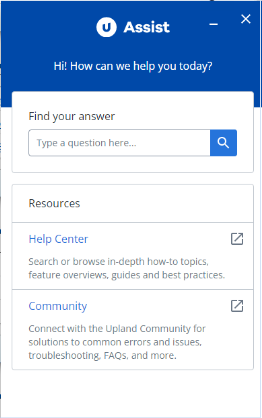
Upland Assist is a single point of access for self-service and customer support directly within Waterfall.
New Help Center
In this release, we introduce a new Help Center, which is available from the Upland Assist pane.
To open the Help Center:
-
Select
Help on the title bar.The Upland Assist pane opens.
-
Select Help Center.
Note: The Help Center opens in a new browser tab.
From the Help Center home page, enter search terms or phrases in the Search box at the top of the page or select a tile to browse the Help Center contents.
-
Select a result to open the topic.
For more information, see What's new.
December 2022
Waterfall UK regional support
The Waterfall application now provides regional support for the following countries in Europe-Spain and France. With this, clients in United Kingdom will be able to send messages outside the United Kingdom.
Metadata filtering improvements
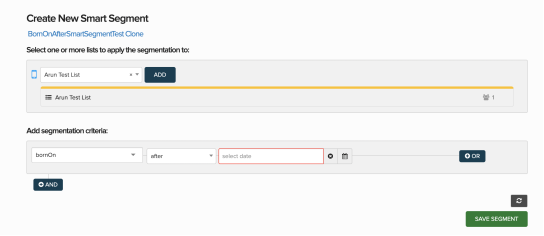
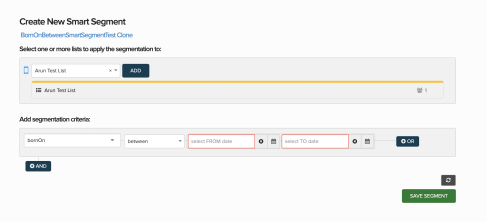
The Waterfall engineering team continues to improve the ability to segment lists within the platform. This latest release includes updates to how lists can be filtered for metadata fields of a date type by adding support for new operators: “after” and “between”.
-
You may now segment a list to target a field that has a date after a specific date using the “after” operator.
-
You can also look for dates between a date range such as customers who have been on a loyalty list during a specific time period using the “between” operator.
User name display on the Schedule Broadcast screen
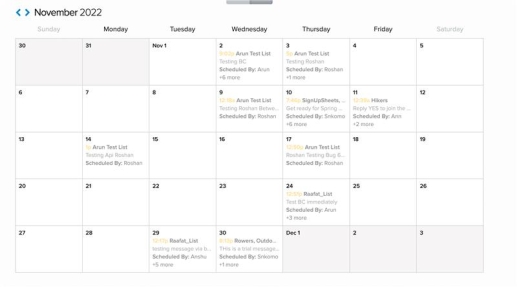
You can now view names of the users who have scheduled the broadcast on the Scheduled Broadcasts screen in the list view and calendar view
November 2022
Waterfall UK regional support
The Waterfall application now provides regional support for the following countries in Europe- Belgium, Italy, Portugal and Germany. With this, clients in United Kingdom will be able to send messages outside the United Kingdom.
Waterfall language updates for Canada short codes
Currently Waterfall only supports entirely French or English responses for HELP/STOP derivatives. With this release, we now support language specific responses for AIDE/HELP and ARRET/STOP to always respond with the corresponding language copy.
Bug fixes and additional updates
-
Time zone broadcast segment duplication issue has been resolved.
-
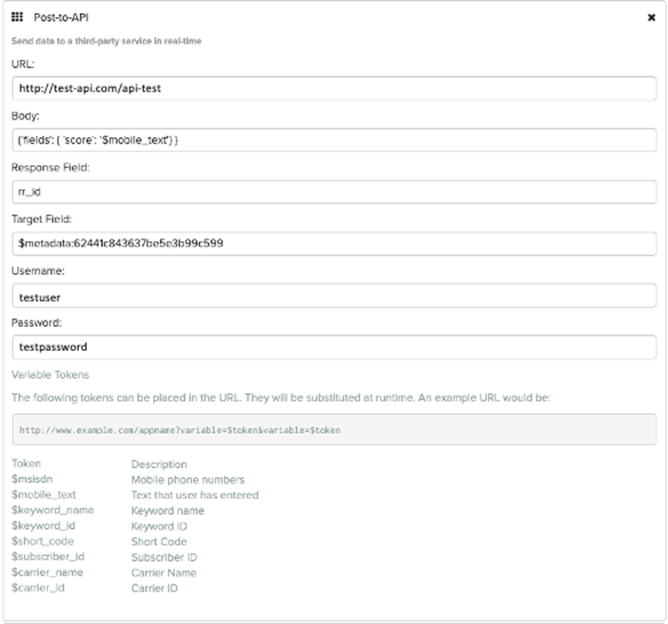
Users will now be able to view the hashed password as text by toggling the eye icon in the Post to API component.
September 2022
Metadata filtering improvements
The Waterfall engineering team continues to improve the ability to segment lists within the platform. This latest release includes updates to how lists can be filtered for metadata fields of a date type by adding support for new operators: “on” and “before”. You may now segment a list to target a field that has a specific date in such as looking for a specific birthdate or join date with the “on” operator. You can also look for dates before a specified date such as customers who have been on a loyalty list for a specific period of time with the “before” operator.
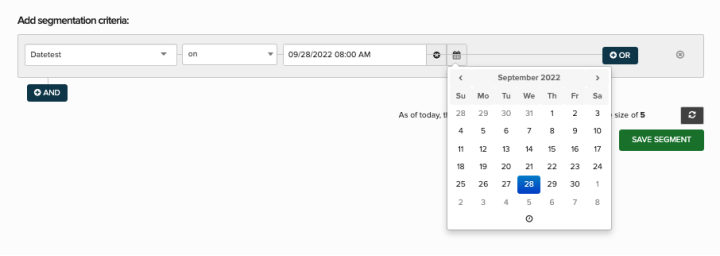
Important note:
The new “on” and “before” operators are only available for metadata of a date type. You can review the data type of a specific metadata field from the platform by navigating to Lists > Metadata and searching for the field you plan to use.
Bug fixes and additional updates
-
General security update: Improved input validation and character recognition.
-
Text entered in the password field of the Post to API component will now show as hashed.
-
Addressed issue when using profile API with no data in the address fields.
May 2022
Post to API component
Waterfall currently supports posting data to a third-party API using scripting. The new Post to API component allows Waterfall users to perform an HTTP POST during a campaign flow. The response provided can be used to dynamically inject data into a message by storing the response as metadata.
Notes:
-
The current implementation supports HTTP POST.
Dynamic Poll component
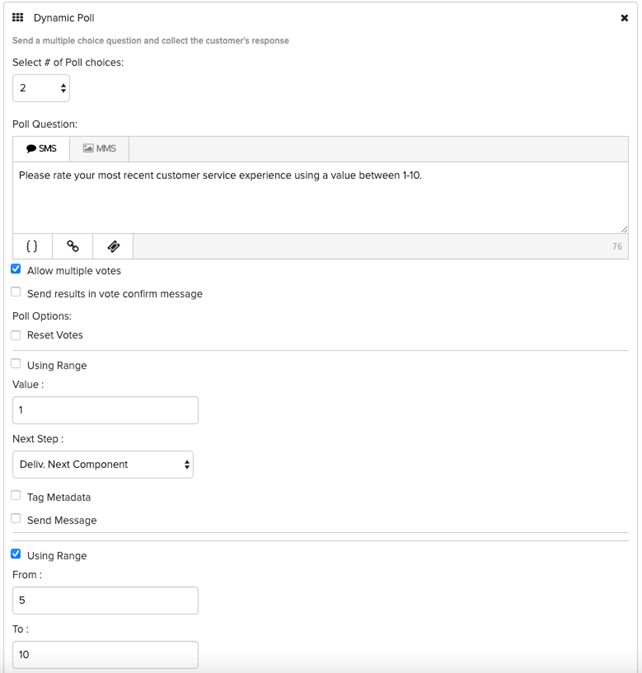
The new Dynamic Poll component enables Waterfall users to take SMS polls and surveys to a new level. Expanding on already exciting functionality provided by the Poll Component, users can now provide numeric ranges in addition to alphabetic options as well as define separate messages based on the responses received to polls. Users can still select the number of poll choices and allow multiple votes using the options in the interface.
Notes:
-
Ranges must include number between 0-10.
Bug fixes
-
Addressed issue causing filters to run slowly during broadcasts.